

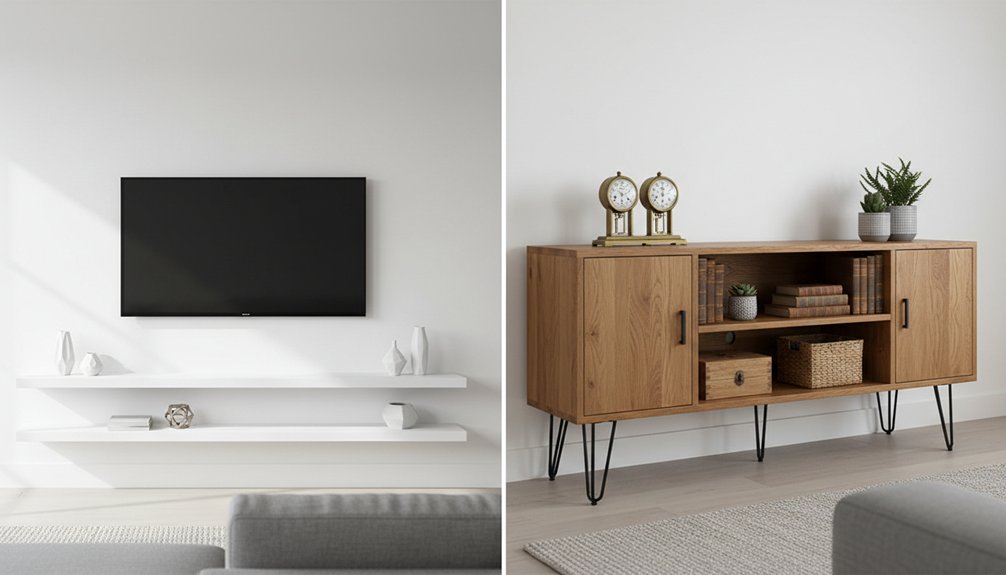
Wall-mounted media units suit spaces with limited floor area, providing a sleek, modern design. Installation costs for wall-mounted units range from $100 to $300, and moving them typically requires wall repairs. Freestanding media units offer a more flexible option, especially for renters. You can relocate freestanding units easily, and they generally provide more storage with additional shelves and cabinets. In terms of longevity, wall-mounted units can last 10 to 15 years, while freestanding models usually last 5 to 7 years.
When deciding between these two options, consider whether you need to save space or prefer flexibility. Pay attention to weight limits and cable management, as these factors can impact your overall satisfaction with either type of unit.
Wall Mounted vs Freestanding Media Units: Key Differences Explained
When you compare wall-mounted and freestanding media units, you’ll see clear differences in functionality and design. Wall-mounted units attach directly to the wall, creating a floating appearance that frees up floor space. In contrast, freestanding units rest on the ground, offering mobility without needing tools for relocation.
Both options have distinct design aesthetics. Wall-mounted units deliver a modern and minimalist look, which can make a room feel more spacious. Freestanding units, on the other hand, tend to provide a more traditional style and typically offer greater storage capacity.
Wall-mounted units create a modern, spacious feel, while freestanding options offer traditional style with enhanced storage capabilities.
Installation processes also differ significantly between the two styles. Wall-mounted units require you to drill into the wall, locate wall studs, and ensure the structure can support the weight of the unit and the equipment on it. This process demands specific tools and skills.
Freestanding units only need simple assembly and placement, allowing most homeowners to handle installation without professional assistance.
If you’re considering either option, think about your design preferences, the amount of storage space you require, and your comfort level with installation tasks. Wall-mounted units suit those looking for a sleek, modern aesthetic, while freestanding units cater to those needing more storage and easier setup.
Which Media Unit Type Saves More Space in Small Rooms?
When you have limited square footage, wall-mounted media units save floor space by attaching to your walls. This design creates an open feel and allows for easier movement in small rooms.
Freestanding media units offer more storage options with drawers and cabinets, but they take up valuable floor space.
Choose wall-mounted units to maximize vertical storage and utilize wall space effectively. In contrast, select freestanding units if you need more storage volume and can accommodate the floor footprint.
Consider your room’s layout and storage needs when deciding between these two options.
Wall-mounted units work best in tight spaces where floor area is at a premium. Freestanding units can be beneficial in larger small rooms where you have more floor area to work with.
Evaluate your specific storage requirements and choose the unit type that aligns with your priorities. Additionally, keeping walkway clearance in mind will ensure that your chosen unit does not obstruct movement within the room.
Wall Units Maximize Floorspace
Wall-mounted media units maximize floorspace effectively, especially in rooms with limited square footage. These units attach directly to walls, which eliminates the need for floor support. By doing so, these wall units create open space underneath, making the room feel larger and less cluttered. This additional space can accommodate other furniture or simply provide more room for movement.
Wall-mounted media units optimize space since they require less depth compared to freestanding cabinets. You can install them at any height, which allows you to customize your viewing experience. This flexibility not only enhances the unit’s visual appeal but also preserves its functionality. The floating design contributes to a modern look that draws the eye upward, improving the overall aesthetic of your room.
Additionally, the absence of furniture legs makes cleaning easier, as vacuuming and mopping can be done without obstacles.
In terms of limitations, wall-mounted media units may not be suitable for every type of wall, particularly those that can’t support the weight of the unit or the equipment it holds. Proper installation is crucial to ensure safety and stability. Always assess wall strength and consider using appropriate anchors or brackets to secure the unit properly.
For practical application, consider measuring your wall space before purchasing a wall-mounted media unit. Ensure that the placement allows for comfortable viewing angles and doesn’t obstruct any existing electrical outlets. This careful planning will help you maximize both the functionality and aesthetics of your living space.
Freestanding Units Storage Capacity
Freestanding media units provide significant storage capacity with their multi-tiered shelving systems and enclosed cabinets. These units can easily accommodate 3-5 gaming consoles or other devices on open shelves while storing over 50 media items in closed cabinets. The design allows you to organize electronics, books, and decorative items efficiently within a single piece of furniture.
| Feature | Capacity | Accessibility |
|---|---|---|
| Open Shelves | 3-5 devices | Immediate access |
| Closed Cabinets | 50+ media items | Hidden storage |
| Drawer Systems | Small accessories | Organized sorting |
Freestanding units do not require permanent installation, allowing for easy relocation whenever you rearrange your room. Their deeper dimensions enable you to store more items without overcrowding your space. The enclosed compartments conceal clutter while keeping your favorite electronics readily accessible on the open shelves.
Freestanding media units excel in providing versatile storage solutions tailored for various needs. For instance, the open shelves are perfect for quick access to gaming consoles, while the closed cabinets keep DVDs and other media out of sight. Drawer systems accommodate smaller accessories, ensuring everything remains organized. This arrangement allows for a tidy living space while maximizing functionality.
Vertical vs Horizontal Dimensions
Storage capacity has minimal value if your media unit doesn’t fit your room’s dimensions properly. Wall-mounted media units optimize vertical space, allowing you to draw the eye upward while keeping the floor area clear.
These units work well in narrow rooms where you can’t afford to sacrifice width. You can utilize the space beneath a wall-mounted unit for additional storage or decorative items, enhancing functionality without crowding the room.
Freestanding media units typically extend horizontally along your wall. These units are more suitable for wider rooms with limited wall height. However, they take up valuable floor area, which can be a drawback in smaller spaces.
When choosing a media unit, consider your room’s shape. Tall, narrow rooms benefit from wall-mounted vertical designs. In contrast, wide rooms with low ceilings accommodate freestanding horizontal units more effectively.
Before making a decision, measure your available wall dimensions carefully. You want to avoid selecting a unit that overwhelms your space or appears awkwardly proportioned.
Which Media Unit Adapts Better to Room Changes?
When choosing between wall-mounted and freestanding media units, consider how each option adapts to potential room changes. Freestanding media units provide more flexibility because you can relocate them easily without needing to repair walls. In contrast, wall-mounted media units require reinstallation, which involves patching holes and redrilling if you decide to rearrange your space.
| Feature | Freestanding | Wall-Mounted |
|---|---|---|
| Relocation Ease | Freestanding units move anywhere instantly | Wall-mounted units require reinstallation |
| Room Redesign | Freestanding units need no structural changes | Wall-mounted units must repair or repaint walls |
| Rental-Friendly | Freestanding units are completely reversible | Wall-mounted units may violate lease terms |
Freestanding media units excel in adaptability, making them an ideal choice for renters or individuals who frequently redecorate. You can easily adjust your entertainment area without drilling into walls. Wall-mounted units are better suited for those who prefer a permanent layout and do not anticipate significant changes in their space.
Weight Limits: How Much Can Each Media Unit Type Hold?
Understanding weight limits is crucial when selecting between wall-mounted and freestanding media units, as each has distinct weight capacities. Wall-mounted media units rely on the strength of the wall and the mounting hardware used. When properly installed, they typically support a weight range of 50 to 150 pounds.
In contrast, freestanding media units can hold more weight, ranging from 100 to 300 pounds, depending on their design and construction quality. This higher capacity results from their ability to distribute weight evenly across a stable base.
When considering wall-mounted media units, assess the wall’s structural integrity and ensure the mounting hardware is rated to handle the expected load. If the wall is made of drywall, you may need to find wall studs for secure installation.
On the other hand, when choosing a freestanding unit, consider the materials used in the construction. Solid wood or high-quality metal often provides greater stability and weight support compared to particleboard or low-grade materials.
Both types of media units have limitations. Wall-mounted units can’t support excessive weight if the wall is weak or if the mounting is done incorrectly. Freestanding units may topple if placed on an uneven surface or if overloaded beyond their capacity.
Therefore, always check the manufacturer’s specifications and weight limits before making a selection.
For practical application, if you’re mounting a TV and plan to store additional equipment, calculate the total weight of the TV and any accessories. Ensure this total falls within the wall-mounted unit’s weight limit.
For freestanding units, factor in the weight of the TV and all components, and choose a unit rated appropriately to avoid stability issues.
Wall Mount Weight Capacity
When selecting wall-mounted media units, prioritize load-bearing capacity for safety. Wall-mounted units generally support weights ranging from 75 to 150 pounds, based on wall type and mounting methods.
For drywall installations, use studs or heavy-duty anchors to ensure the unit can manage the weight effectively. Distributing the weight across multiple mounting points enhances stability.
Concrete and brick walls provide more support compared to standard drywall, which is essential to consider.
Calculate your TV’s weight along with additional components like soundbars, gaming consoles, and decorative items to determine the total load.
Professional installation can accurately place anchors and minimize the risk of failures during use. Always consult manufacturer specifications and adhere to weight limits to avoid accidents and property damage.
Freestanding Unit Load Limits
Freestanding media units typically support heavier loads than wall-mounted units. Most models handle between 150 and 300 pounds, depending on their construction and design. Solid wood units offer the highest weight capacity, ranging from 250 to 300 pounds, while particle board units provide a more modest support of 100 to 150 pounds. When placing heavy equipment on upper shelves, you must distribute the weight evenly to maintain stability.
| Material Type | Weight Capacity | Price Range |
|---|---|---|
| Solid Wood | 250-300 lbs | $400-$1200 |
| Engineered Wood | 200-250 lbs | $200-$500 |
| Metal Frame | 150-300 lbs | $300-$800 |
| Particle Board | 100-150 lbs | $100-$300 |
| Glass/Metal Combo | 150-200 lbs | $250-$600 |
You can adjust shelf heights and configurations in freestanding designs to fit specific equipment needs. This versatility allows you to customize your media unit for optimal functionality. Remember, if you exceed the recommended weight limits or fail to distribute weight evenly, you risk compromising the unit’s stability and safety.
For example, when using a solid wood unit, you can confidently place up to 300 pounds on the shelves. However, with a particle board unit, you should avoid exceeding 150 pounds. Always check the specifications before loading your media unit to ensure it performs safely and effectively.
Which Media Unit Type Is Easier to Install?
When comparing wall-mounted media units and freestanding media units, installation difficulty clearly favors freestanding units.
Freestanding media units are straightforward to install. You take the unit out of the box, place it in your desired location, and that’s the entire process. You don’t need tools for drilling, measuring, or finding wall studs.
Freestanding units offer unmatched simplicity: unbox, position, and you’re done—no drilling, measuring, or special tools required.
In contrast, wall-mounted media units require more complex installation steps. You must locate the studs in your wall, drill holes accurately, and ensure that the unit is level.
This process usually requires specialized tools like stud finders, levels, and power drills. Additionally, you must manage the cables and confirm that your wall can support the weight of the unit.
If you aren’t experienced with these tasks, hiring a professional for installation may be necessary, which can increase your overall costs.
Wall Mounted vs Freestanding: Which Handles Cables Better?
When choosing between wall-mounted and freestanding media units, cable management is a critical factor. Each option has a different method for organizing wires and cables, impacting both functionality and aesthetics.
Wall-mounted units conceal cables by routing them through the wall. This process creates a clean and streamlined appearance. However, wall-mounted installations typically require professional help, which can add to the overall cost and complexity.
Freestanding units manage cables differently. They include built-in wire channels that guide cables down the back panel, keeping them organized. The enclosed backs of these units hide unsightly wires from view, while open shelving provides easy access for adjustments.
Users can employ cable ties and clips that attach directly to the unit’s frame for further organization. Freestanding units allow for easier repositioning of equipment. Their design makes troubleshooting straightforward, as users can quickly access cables.
However, the visible cables may detract from a polished look in the room.
Which Type Costs More Over Time?
Understanding the long-term costs of wall-mounted and freestanding media units helps you make better investment decisions.
Wall-mounted media units generally have higher upfront costs, often ranging from $100 to $300 for mounting equipment and professional installation. These costs arise because wall-mounted units require specialized hardware and may involve wall repairs. However, wall-mounted units tend to last longer, often between 10 to 15 years, because they’re securely fixed to the wall and protected from damage that can occur at floor level.
Wall-mounted units cost more initially but last 10-15 years, avoiding floor-level damage that shortens freestanding alternatives’ lifespan.
In contrast, freestanding media units have lower initial costs since you can purchase and set them up yourself. However, you may face higher long-term expenses with freestanding units. These units might need replacement every 5 to 7 years due to wear and tear, damage from moving, or scratches caused by pets or cleaning.
When considering total ownership costs, factor in the lifespan of each unit type and the potential need for replacements, rather than only the initial purchase price. This analysis will guide you in making a more cost-effective choice.
Small Room or Large Room: Which Media Unit Fits Your Space?
When selecting a media unit for your space, consider room size as a crucial factor in your decision-making process. Small rooms and large rooms require different types of media units to maximize functionality and aesthetics.
Small rooms benefit from wall-mounted units because they:
- Wall-mounted units free up valuable floor space, allowing for easier movement and additional furniture arrangements.
- They create an illusion of more square footage by keeping the floor area clear.
- Wall-mounted units simplify cleaning, as you can easily access the floor beneath without furniture hindrances.
- These units enhance design by drawing attention upward, making the room feel more open.
Large rooms accommodate freestanding units effectively because they:
- Freestanding units fill empty wall spaces, preventing the room from feeling sparse or unbalanced.
- They provide ample storage for larger media collections, helping you keep everything organized.
- The substantial presence of freestanding units anchors the room’s overall functionality and design.
- Freestanding units offer flexibility, allowing you to reposition furniture easily based on your layout preferences.
Before making your final decision, measure your available space accurately. Additionally, consider traditional furniture styles as they can influence how media units integrate with your overall design theme.
Assess traffic flow patterns and existing furniture placements to ensure your chosen media unit fits well within your room’s dimensions and enhances its overall functionality.