
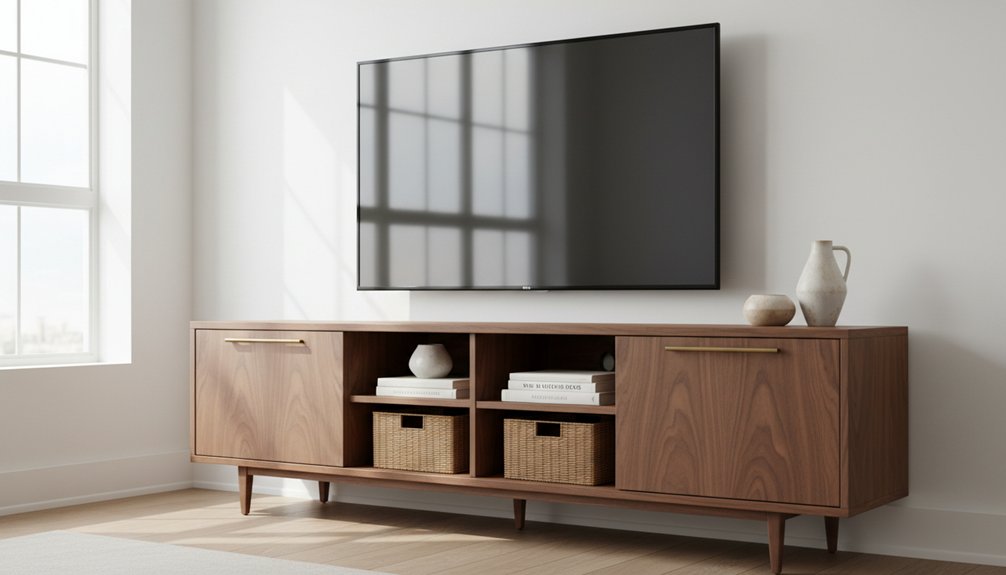
When you select a living room media unit, start by measuring your TV width. Add at least six inches to each side of the TV for ventilation and visual balance. Choose a style and material that aligns with your existing décor; for instance, solid wood provides durability while composite materials offer a more budget-friendly option.
Focus on essential features such as cable management systems, which keep cords organized, and ensure your unit has adequate ventilation for electronics to prevent overheating. Adjustable shelving is important as it allows you to accommodate various equipment sizes.
Decide whether a wall-mounted or freestanding design suits your space better. Wall-mounted units save floor space, while freestanding units may offer more storage options. Finally, allocate your budget toward high-quality construction and functional features, ensuring you invest in a media unit that delivers long-term value.
How Big Should Your Media Unit Be? Measuring for TV Size and Space
Before you shop for a media unit, measure your TV and the available wall space in your living room. First, measure your TV’s width. Then, add at least six inches to this width on each side. This total width ensures proper ventilation and maintains an aesthetically pleasing appearance. Use this measurement to filter your search for media units.
Next, measure the wall space from corner to corner, taking note of any electrical outlets, windows, or other obstructions. Compare your TV width plus the six inches with your wall space measurements. Ensure the media unit you choose won’t overcrowd the room.
Your media unit must be wider than your TV. This ensures stability and prevents a top-heavy look. Check the dimension charts provided by manufacturers that match TV sizes with recommended unit widths. This step simplifies your selection process and helps you find a unit that fits well in your space. Additionally, maintaining at least 30 inches of clearance around the media unit will facilitate movement and enhance the overall flow of your living room.
Choosing the Right Style and Material for Your Living Room
Once you determine the right size for your media unit, you must choose materials and styles that fit your living room.
Select between solid wood and composite materials, as this decision impacts durability and cost. Solid wood offers longevity but typically comes at a higher price. Composite materials are budget-friendly but may not endure as long.
Next, focus on the finish and hardware. Choose finishes that match your existing furniture to create a cohesive look. If your living room features modern decor, opt for sleek, minimal hardware. For a traditional space, consider ornate knobs and pulls.
The style of your media unit—modern, traditional, or rustic—directly influences the overall ambiance of your living room. A modern media unit with clean lines promotes a contemporary feel, while a rustic unit adds warmth and character. Always ensure that the style aligns with your existing decor to maintain harmony in the space. Additionally, consider the unique grain patterns of solid wood, which can enhance the visual appeal of your media unit.
Wood Versus Composite Materials
When choosing a media unit for your living room, you must evaluate solid wood and composite materials. Each material brings specific advantages tailored to different needs and budgets.
Solid wood provides exceptional durability. It lasts for decades with proper maintenance and resists scratches better than composite options. You can refinish solid wood multiple times, which helps maintain its appearance over the years.
However, solid wood media units tend to be more expensive and heavier, making them more challenging to move.
Composite materials, such as MDF and particleboard with veneer finishes, offer versatility. They come in various colors and styles at lower price points, making them accessible for tight budgets.
These units are lighter and easier to assemble, which suits temporary spaces. However, composite materials generally have reduced longevity and limited refinishing options compared to solid wood.
Your choice between solid wood and composite materials depends on your budget, the intended lifespan of the furniture, and your preferred aesthetic.
If you’re looking for long-lasting durability, solid wood is the better option. If you need something budget-friendly and easy to assemble, composite materials may be the way to go.
Matching Your Décor Style
After you choose the right material for your media unit, assess how it integrates with your living room‘s overall design. A media unit must complement your existing furniture instead of clashing with it.
Identify your room’s dominant style—modern, traditional, rustic, or contemporary—and select a media unit that adheres to this aesthetic.
Color coordination is essential for a cohesive space. Match the finish of your media unit to other wooden furniture pieces or select a contrasting shade that fits within your overall color palette.
Consider design elements like hardware, leg styles, and proportions to achieve furniture harmony. For instance, a sleek, minimalist media unit suits modern spaces, while ornate details are better for traditional rooms. This careful selection process ensures that your media unit enhances your living room’s visual flow rather than disrupts it.
When selecting a media unit, prioritize functionality and visibility for your electronics. Ensure that the unit has adequate space for your TV, gaming consoles, and other devices, while also allowing for proper ventilation.
Design your media unit to accommodate cables and accessories neatly, avoiding clutter. Additionally, consider the size of your room; a large media unit in a small space can overwhelm the area, while a small unit may get lost in a larger room.
Finish and Hardware Options
The finish you choose for your media unit directly affects its durability and appearance. Common finish options include natural wood stains that highlight grain patterns, painted surfaces in matte or glossy sheens, and laminate coverings that resist scratches and moisture.
Natural wood finishes require regular maintenance to preserve their beauty, while painted surfaces allow you to customize colors to match your existing decor. Laminate finishes provide a budget-friendly solution, especially in areas with high traffic where durability is a priority.
Your hardware choices are equally important for functionality and style. Selecting knobs and pulls made from materials like brushed nickel, antique brass, or matte black can enhance the overall look of your media unit.
Installing soft-close hinges on cabinet doors prevents slamming and extends the life of the doors. Ensure that the finishes of your hardware match other fixtures in the room for a cohesive design.
Investing in quality hardware guarantees smooth operation of drawers and long-lasting performance.
Media Unit Storage: How Much Do You Need and What Type?
Determining how much storage space you need depends on your equipment, media collection, and lifestyle habits.
Start by identifying your devices, such as gaming consoles, streaming boxes, cable equipment, and sound systems. Next, assess your physical media like DVDs, Blu-rays, and vinyl records.
Open shelving displays decorative items and frequently used remotes, while closed cabinets conceal clutter and protect electronics from dust.
Drawer storage solutions provide easy access to cables, controllers, and manuals. If you primarily stream content, you’ll require less storage than someone with a large collection of physical media.
Measure your items before purchasing any storage unit to ensure it accommodates everything comfortably. Avoid overcrowding or leaving excessive empty space. Additionally, consider incorporating functional design into your media unit selection to enhance both aesthetics and usability.
Essential Features: Cable Management and Ventilation Explained
Once you assess your storage needs, focus on cable management and ventilation to optimize your media unit’s functionality. Modern electronics generate significant heat and require multiple connections, making these features crucial for performance and longevity.
Cable management organizes wires efficiently. Look for media units with built-in cable channels that route wires through the back panel. This design keeps your cables neat and easily accessible. Units with integrated cable management prevent tangling and simplify future adjustments.
Ventilation prevents overheating. Choose media units with open backing or cutouts that allow heat to escape, making connections easier. Look for units featuring slatted doors or perforated panels in enclosed compartments. These ventilation designs promote airflow and protect your devices.
Adjustable shelving enhances usability. Select units with adjustable shelves that accommodate varying equipment heights while ensuring proper airflow. This flexibility allows you to fit different devices without compromising ventilation.
Wall-Mounted or Freestanding: Which Media Unit Is Right for You?
Wall-Mounted vs. Freestanding Media Units: Choose the Right Option for Your Space
Wall-mounted media units save floor space and create a modern, floating look. They work best in small rooms where you want to maximize available area and simplify cleaning underneath. Freestanding media units provide more flexibility; you can easily move them without causing wall damage, and they typically offer greater storage options.
| Feature | Wall-Mounted Media Units | Freestanding Media Units |
|---|---|---|
| Installation | Wall-mounted units require professional mounting for secure placement. | Freestanding units feature a simple setup that doesn’t require installation. |
| Flexibility | Wall-mounted units remain in a fixed position once installed. | Freestanding units can be relocated easily to accommodate different layouts. |
| Storage | Wall-mounted units have limited storage capacity due to their design. | Freestanding units maximize storage space, providing various shelves and compartments. |
Evaluate your room size, rental situation, and storage needs to make an informed choice. Wall-mounted units fit minimalist designs and smaller spaces, while freestanding units are better for those needing significant storage or who frequently rearrange their furniture.
Where to Spend and Where to Save on Your Media Unit
After choosing the right media unit for your space, allocate your budget effectively. Prioritize spending on key features that enhance durability and functionality while minimizing costs on less critical aspects.
Spending Strategies
- Invest in Quality Materials: Spend on sturdy materials for the frame and construction. Quality materials ensure the media unit lasts longer and withstands daily use.
- Save on Decorative Hardware: Choose simple hardware designs. Simple designs are cost-effective and can be easily upgraded later without significant expense.
- Spend on Adjustable Shelving: Prioritize adjustable shelving systems. Adjustable shelves allow you to modify storage configurations as your needs change, making them a valuable investment.
- Save on Built-in Lighting: Avoid units with built-in lighting. Instead, opt for models without this feature and consider adding separate lighting solutions later if necessary.
Focus Areas
Concentrate your budget on structural integrity and functionality. By investing in these areas, you ensure the media unit serves its purpose effectively.
Prioritize spending on structural quality and practical features to maximize your media unit’s long-term value and performance.
You can enhance the unit’s aesthetics later with affordable accessories and styling options.
Top Media Unit Picks by Style and Budget
Finding the right media unit involves understanding how different styles align with specific price ranges.
Modern media units typically feature clean lines and minimalist designs, costing between $300 and $800. These units often include sleek glass shelves and metal accents that fit well in contemporary spaces.
For those on a budget, laminate media units with wood-grain finishes start around $150. These units provide an affordable option without sacrificing style.
Mid-century modern media units, priced between $400 and $600, combine aesthetic appeal with practical functionality, making them a popular choice for many homes.
Traditional wood media units, characterized by ornate details, can range from $500 to $1,200. These units often serve as statement pieces in more classic interior styles.
If you prefer a Scandinavian look, expect to pay between $250 and $500 for designs that emphasize simplicity and quality craftsmanship.
Industrial-style media units, featuring metal frames and reclaimed wood, typically cost between $350 and $700. These units offer a rugged, urban aesthetic that suits various environments.
To find the best media unit for your space, match your preferred style with your budget. This approach ensures you achieve both aesthetic satisfaction and financial comfort while selecting the right piece for your home.